
Envelopes & Goals
An envelope is a named amount of money with a job. Afford has three kinds — Spending, Bills & Subscriptions and Savings Goal — and they differ mainly in how they think about time. (Each credit card also gets a payment envelope of its own; see Credit Cards.)
Spending envelopes
The everyday workhorses: Groceries, Dining Out, Fun Money. You give them a monthly contribution, they fill when you allocate and drain through the month. Whatever’s left carries into next month, so a light grocery month really does buy you a heavier one. A shortfall carries too: an envelope that ends the month below zero starts the next one there, and that month’s plan asks for the difference on top as Uncovered from last month.
Besides what goes in, an envelope has a monthly planned spend — the pace to hold its spending to. It follows the plan unless you set your own, and it’s a guide, not a wall: money that’s available can always be spent past it.
Bills envelopes
For the predictable stuff: Utilities, Subscriptions, Insurance. A bills envelope holds a list of recurring bills — each with a name, amount, frequency and next due date. From that list, Afford works out the smallest steady monthly allocation that keeps every payment covered when it lands — including the annual ones that would otherwise ambush you in March. If you’re behind, it works out the catch-up too, shown on the envelope’s page as Bills catch-up this month. An optional safety buffer adds a few percent on top.
Bills show up on the Plan home under Due in the next 7 days, and Auto-allocate funds bills first. A bill knows the account it’s paid from and can record its own payment when it’s due; with a linked bank, a matching transaction rolls the due date forward on its own. See Activity for recording payments by hand.
Savings envelopes
For money with a horizon: Emergency Fund, Vacation, New Laptop. Savings envelopes accumulate — their balance is the point — and their planned spend is zero unless you set one, so the vacation fund never masquerades as taco money. The Spend tab counts what they hold in its “extra in savings” cushion instead of the month’s spending plan.
A savings envelope can carry a goal: a target amount, optionally by a date ("$3,000 by next June"). Pick how to get there — pace it to a target date, the same amount until the target, refill to the target every month, or the same amount every month — and Afford turns that into a monthly figure and shows progress in the Plan home’s Goals section.
Sub-goals
One savings envelope can hold several goals at once. A Vacation envelope might contain Hawaii ($2,400 by February) and Ski weekend ($600 by May) as sub-goals — each with its own pace, progress bar and countdown, all sharing one pool of money and one row in your plan.
Money in the envelope that isn’t earmarked for a sub-goal sits in its General bucket, and the general bucket has a plan of its own on top of the sub-goals: the month asks for each sub-goal’s share plus the general share. Each sub-goal and the general bucket show two lines — Planned save against what was saved, and Planned spend against what was spent — on the envelope’s page and under the envelope’s row on the Plan tab. Each sub-goal’s ⋯ menu lets you plan its month, allocate to it, move money within the envelope, or record spending against it; tag a purchase to a sub-goal with Toward when you file it.
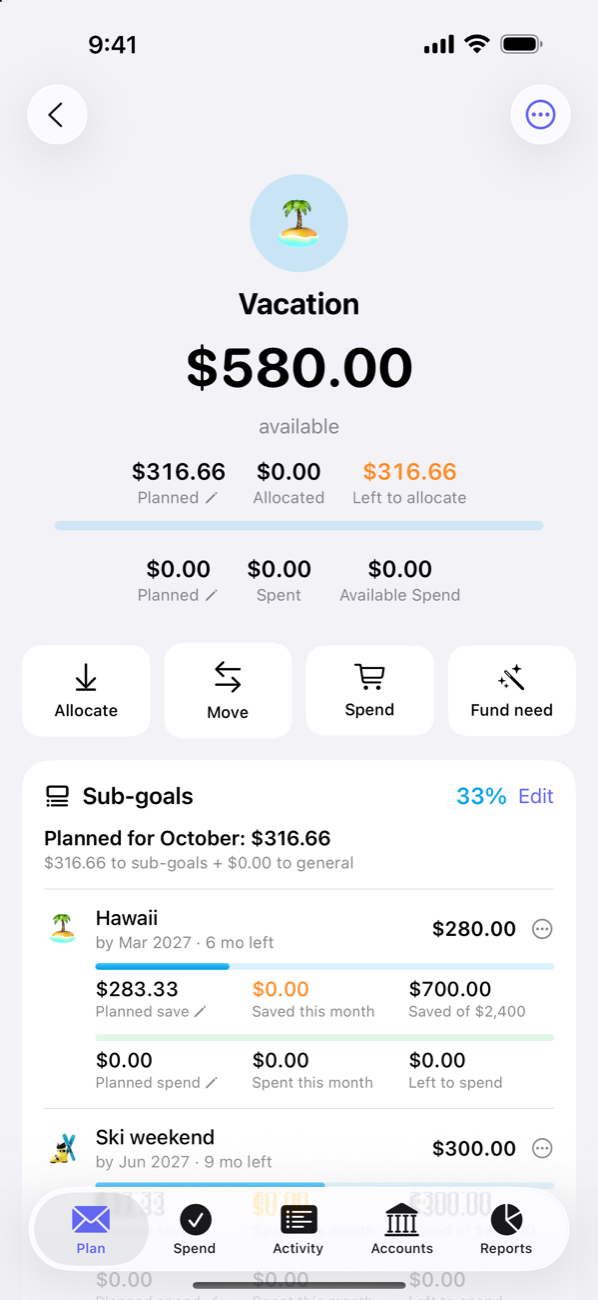
The envelope page
Tap any envelope to see its full story: the available balance up top, the allocation and spending tracks for the month, then four actions — Allocate, Move, Spend (record a transaction straight into this envelope), and Fund need (top up to exactly what the plan calls for). Below that: an Overspent card with Cover it if the envelope went below zero, sub-goals, recurring bills, Allocations & moves (every allocation, take-back and move this month, including money moved in from another envelope to cover overspending), and the transaction history.
The ⋯ menu has Edit settings — name, emoji, color, kind, group, recurring bills, contribution, planned spend, sub-goals and notes — and Plan [month]…, which changes just this month: a December bump for Gifts doesn’t have to change the plan for the whole year. Tap Planned on the envelope page to get there too.
Groups
Envelopes live in groups — Essentials, Lifestyle, Savings, or whatever structure fits your head. A new budget starts with those three groups and a handful of standard envelopes (Groceries, Rent, Utilities, Dining Out, Subscriptions, Emergency Fund, Vacation) — names only, no amounts — ready to fill in, rename or delete. Groups are purely organizational: they sum their envelopes on the Plan tab and collapse out of the way. Reorder and rename them in Settings → Start month, currency & groups.
Housekeeping
- Hide an envelope you rarely touch (Settings → Display → Show hidden envelopes brings them back).
- Hide empty envelopes (also under Display) tidies the list to just where money lives.
- Sort envelopes manually or by name, available balance, or need.
- Deleting an envelope with money in it sends the money back to Available to Allocate — dollars are never lost in the shuffle. Its transactions become uncategorized.
- The free version of Afford includes up to 10 envelopes (card payment envelopes don’t count); unlimited envelopes are part of Afford Pro. If you go back to free, every envelope you have stays — you just can’t add more.