
Credit Cards
Credit cards are where most money plans quietly fall apart: you spend from an envelope in March, the bill lands in April, and suddenly the same dollars need to exist twice. Afford closes that gap automatically.
The payment envelope
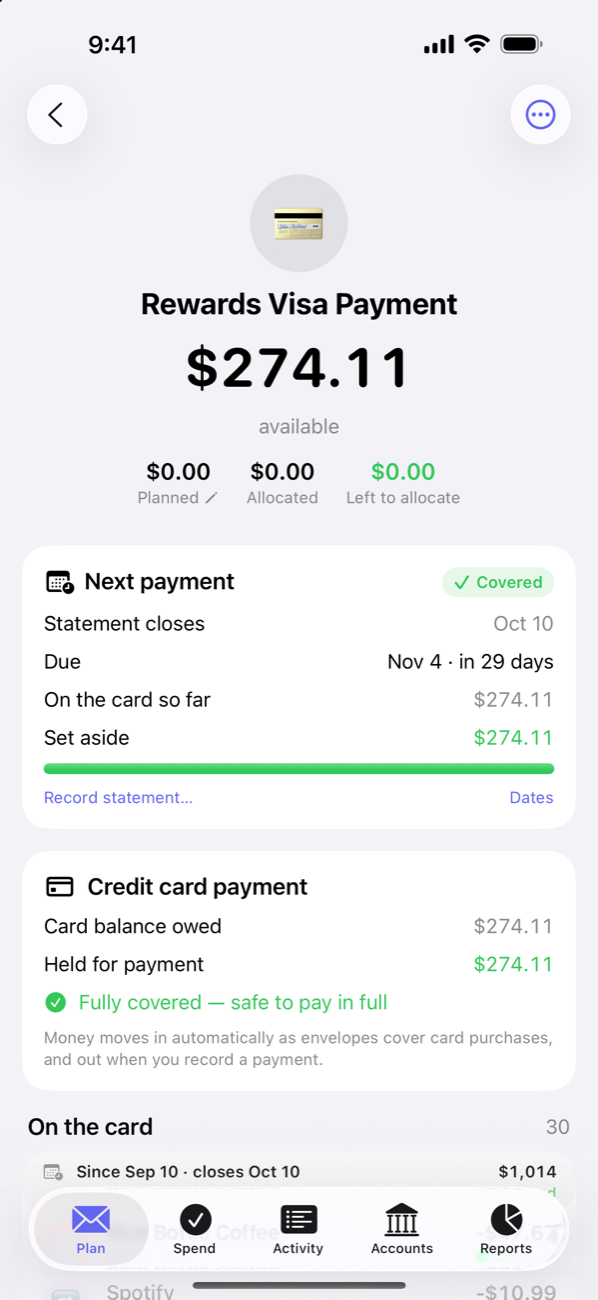
Every on-budget credit card gets a payment envelope (in a Credit Card Payments group). When you buy groceries on the card, two things happen at once:
- The transaction draws down your Groceries envelope, like any spending.
- The same amount moves from your cash into the card’s payment envelope — set aside, earmarked for the bill.
So the moment you swipe, the future payment is already funded. The Plan tab’s hero card shows this as Held for Cards: cash you still have, but that belongs to card bills, kept out of Available Cash so you can’t accidentally plan it twice.
Covered — or not
A card purchase is only auto-covered when the envelope it drew from had the money. Buy $60 of dinner from a Dining Out envelope holding $40, and only $40 moves to the payment envelope — the other $20 becomes Uncovered Card Spending, shown plainly on the Plan tab’s hero (and on the purchase itself as “$40 of $60 covered”). That’s your honest signal that the bill is growing faster than the plan. Allocate more to the envelope and the rest is covered, oldest purchase first; Cover spending on the hero does it for every envelope at once, from the month’s own money. Back on Track includes it in the fix.
Statement cycles
Give a card its Statement cycle under Edit account — the day the statement closes and the day payment is due — and its account page shows the cycle the way your bank does: when the statement closes, when payment is due, what’s on the card so far, and what’s Set aside against it, marked Covered once the money is there. When the statement arrives, Record statement… enters its actual date and balance (those always win over the calculated ones). The Record payment button on the card’s page records a payment from one of your bank accounts, with quick picks for what the payment envelope holds or the full balance — handy when the card isn’t synced.
Money set aside for purchases made after the statement closed isn’t due until the following payment. Float lets you borrow it in the meantime — moving it to Available to Allocate or another envelope — as long as you put it back before that later due date.
Payments settle the card’s charges oldest first, by date — but only charges that were already on the ledger when the payment arrived. A charge the bank reports late waits for the next payment rather than reshuffling what’s already been settled.
Starting with existing card debt
Connect a card that already carries a balance and Afford doesn’t pretend otherwise: the balance from before your budget started is the oldest thing on the card, and it’s spending to cover like any other. Cover spending takes it from the month’s own money into the card’s payment envelope, and Back on Track can spread it over a payoff plan at whatever pace works. If you pay toward the old balance before anything is set aside for it, the payment envelope goes below zero in the month you paid, so that month allocates it from its own income rather than the cash quietly disappearing; the payment shows “toward old balance” in Activity. New spending still covers itself in the meantime — the old hole stops growing while you fill it.
Bills paid on a card
Put a recurring bill on a card and it still counts as paid: a matching charge in the bill’s envelope (its name or amount, near the due date) rolls the due date forward, whether it was synced or typed in. And a bill charged to the card isn’t asked for twice — the plan for the next month won’t add it again on top of the card spending that already covers it.
Paying the card
When the payment transaction syncs in from your bank, Afford recognizes it (a PAYMENT THANK YOU from the card side, a transfer from the checking side), links the two rows, and draws down the payment envelope. If it can’t tell which account paid, the row lands in the review queue with a one-tap Paid from… prompt. Without bank sync, use Record payment on the card’s page; it records both sides for you.