
Back on Track
Some months go sideways. The car needs tires the same week the concert tickets go on sale, an envelope runs dry and you buy the thing anyway. This is not a moral event. It’s a bookkeeping event, and Afford treats it like one: it shows the hole plainly and builds the way out.
How Afford tells you
When the plan springs a leak, the hero card on the Plan tab changes from Available to Allocate to Overspent, with the total and a plain sentence about what happened. Below it (on iPad and Mac, at the top of the left column), the Back on track card itemizes exactly what’s wrong rather than waving a vague red flag:
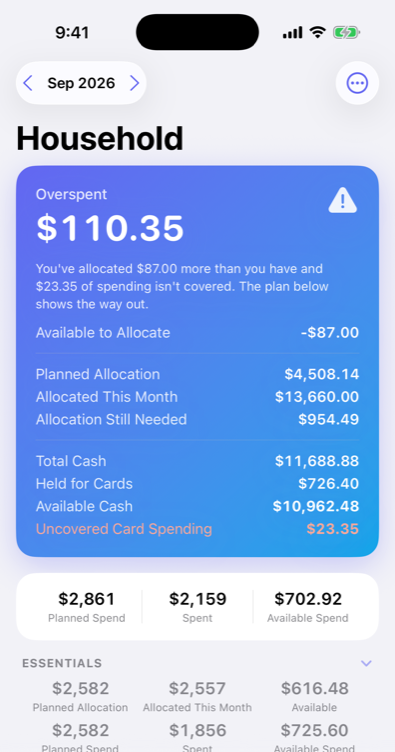
Three different things can be true, alone or together:
- You’ve allocated more than you have — Available to Allocate has gone negative (often after getting ahead on next month, then a surprise expense).
- Spending isn’t covered — an envelope went below zero; the purchase happened but no money was set aside for it.
- Card purchases not covered yet — card purchases whose envelopes couldn’t cover them, so the payment envelope is short for the coming bill. The hero shows these as Uncovered Card Spending.
Older card debt with nothing set aside — a balance from before your plan began, say — is listed there too, separately.
Envelope holes don’t evaporate at month end — a negative balance carries forward until it’s dealt with, and next month’s plan for a spending or bills envelope asks for it on top. That sounds stern, but it’s the opposite: because holes are visible, they’re fixable, and because they’re fixable, they’re not scary.
The Back on Track plan
Under The way out, the card builds a concrete fix rather than leaving you to stare at red numbers:
- It finds the money — Available to Allocate first, then slack in flexible spending envelopes, most spare first — and proposes exactly which dollars cover which hole. It never raids bills or savings goals on its own.
- It’s specific: Groceries → Dining Out $40, Available to Allocate → Gas $23.35 — not “spend less next time.”
- One tap applies the whole plan: Fix it.
If the month doesn’t have enough slack, the card says how much is still short: the next income that lands in Available to Allocate goes there first — or trim an envelope. For older card debt, tap Plan to spread it over a few months; the monthly share shows up under Needs funding like any other bill.
Covering it yourself
Prefer to choose? Each overspent envelope in the card has a Cover menu, and an overspent envelope’s own page has Cover it. Both offer:
- From Available to Allocate
- From an envelope with spare money — the flexible envelopes with the most slack
- From savings or a goal — never suggested automatically, but your call to make: let the General Savings envelope cover an Entertainment overspend if that’s what you’d rather do
- Choose an envelope… — pick any envelope by hand
Whatever you pick shows on both envelopes’ pages under Allocations & moves, so you can always see where the money came from.
To cover everything at once, use Cover spending on the hero card, or Cover this month’s spending in the ⋯ menu on the Plan or Spend tab: it covers overspent envelopes first, then what’s on your cards, oldest first, until Available to Allocate runs out. It only covers money already spent — it never pre-funds a goal or a future bill.
Spending your way out
Covering isn’t the only fix. When an envelope carries a hole in from last month, Plan [month]… on its page (tap Planned) offers two buttons under Back on track: Cover it — this month’s plan plus the overspend, so you allocate your way out — or plan minus the overspend as this month’s planned spend, so you spend your way out. The Spend tab’s budget sheet offers the same Back on track budget. Either way, only that month changes.
Each month keeps to its own money
Covering a past month’s hole only ever uses that month’s money — its own income and Available to Allocate — so fixing August never spends September’s paycheck. Whatever a month can’t cover waits for a later month, which covers it from its own money. If a month’s allocations are a tangle, Redo this month’s allocations in the ⋯ menu takes back everything allocated in it and covers what it actually spent, in the same order, with that month’s money alone.
The philosophy, restated
A budget app treats overspending as failure and answers it with guilt. Afford treats it as drift and answers it with a course correction. You already did the hard part by having a plan at all — the fix is just pointing some dollars at a different job than you first guessed. That’s not falling off the wagon. That’s steering.